Cell Locator

Position from mobile network signals — no GNSS required
⇩  Download APK
Android app package (.apk)
Requires Android 12 or newer
LTE & 5G NR Live accuracy gauge Map view Compass navigation Learn mode
QR code linking to this download page
Scan on your phone to
open this page
Accuracy & confidence: position accuracy is typically in the low hundreds of metres — sometimes better — in areas covered by the reference survey. Every estimate is reported with an honest accuracy radius and a confidence score, so you can see how much to trust each fix; expect lower confidence and larger errors in unsurveyed areas.

Cell Locator estimates your position from the cellular signals your phone already hears — serving and neighbour cells, signal strength and timing advance — matched against a reference survey on the server. It is a proof-of-concept accuracy tester: it shows the cell-based estimate, and when a GNSS fix is available it displays the error between the two so you can see how the technique performs.

Installing

  1. On your Android phone, tap Download APK above.
  2. Open the downloaded cell-locator.apk (from the notification or your Downloads folder).
  3. Android will warn that the app is from an unknown source — this is normal for apps installed outside the Play Store. Tap Settings, enable Allow from this source for your browser, then go back and tap Install.
  4. Open Cell Locator and grant the Location and Phone permissions when prompted — both are needed to read cells and GNSS. Choose Precise location and, for background sampling, Allow all the time.
Why the "unknown source" warning? This app is distributed directly rather than through the Play Store, so Android asks you to confirm. Only install it if you trust this source.

Using it

  1. Tap Start. The app samples every 15 seconds (adjustable in Settings).
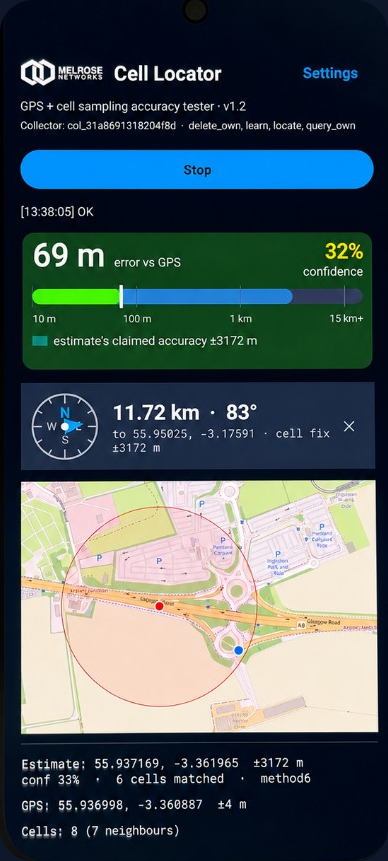
  2. The large gauge shows the error between the cell estimate and your GNSS position, colour-coded green / amber / red, with the estimate's own confidence top-right.
  3. The cell table lists the serving cell (marked S) and neighbours, with cell IDs in hex.
  4. Settings → Show map plots your GNSS position (blue) and the cell estimate (red) so you can compare them directly.

Navigation mode

Set a destination (long-press the map, or type a latitude, longitude in Settings) and the app shows a north-up compass with a needle pointing to the destination, plus the distance — computed entirely from the cell-based fix, no GNSS. Orient the top of the phone to north to follow it. Accuracy is coarse (typically hundreds of metres), so treat it as area guidance, not turn-by-turn.

Learn mode optional

With Learn mode on, the app also sends its GNSS fix alongside each measurement so the server can grow its reference survey — improving estimates on later passes through the same area. It is off by default.

Privacy: in normal use only cell measurements are sent to the server; your GNSS position stays on the device and is used locally to score accuracy. Your location is transmitted only if you explicitly enable Learn mode, and learned data is stored without time-of-day timestamps by default. See the full privacy notice.
The app is pre-configured to use this server (cellpos.melrosenetworks.com). Coverage depends on where the reference survey has data, so accuracy is best on surveyed roads and areas.

Area exclusion requests

Law enforcement, defence and military organisations may request that specific geographic areas be excluded from the survey data used by Cell Locator. Requests should be emailed to support@melrosenetworks.com and include the GPS coordinates defining the area to be excluded.